Patchworks Virtual Environments: A Guide for Agencies
Learn how Patchworks virtual environments let agencies run one set of master process flows across every client store, brand and sandbox, without duplicating work.
What Are Patchworks Virtual Environments?
If your agency runs Patchworks integrations for clients with more than one store, brand or region, you have probably seen the same process flow copied over and over. There is one copy for the UK sandbox, one for UK live, one for the EU store, and so on.
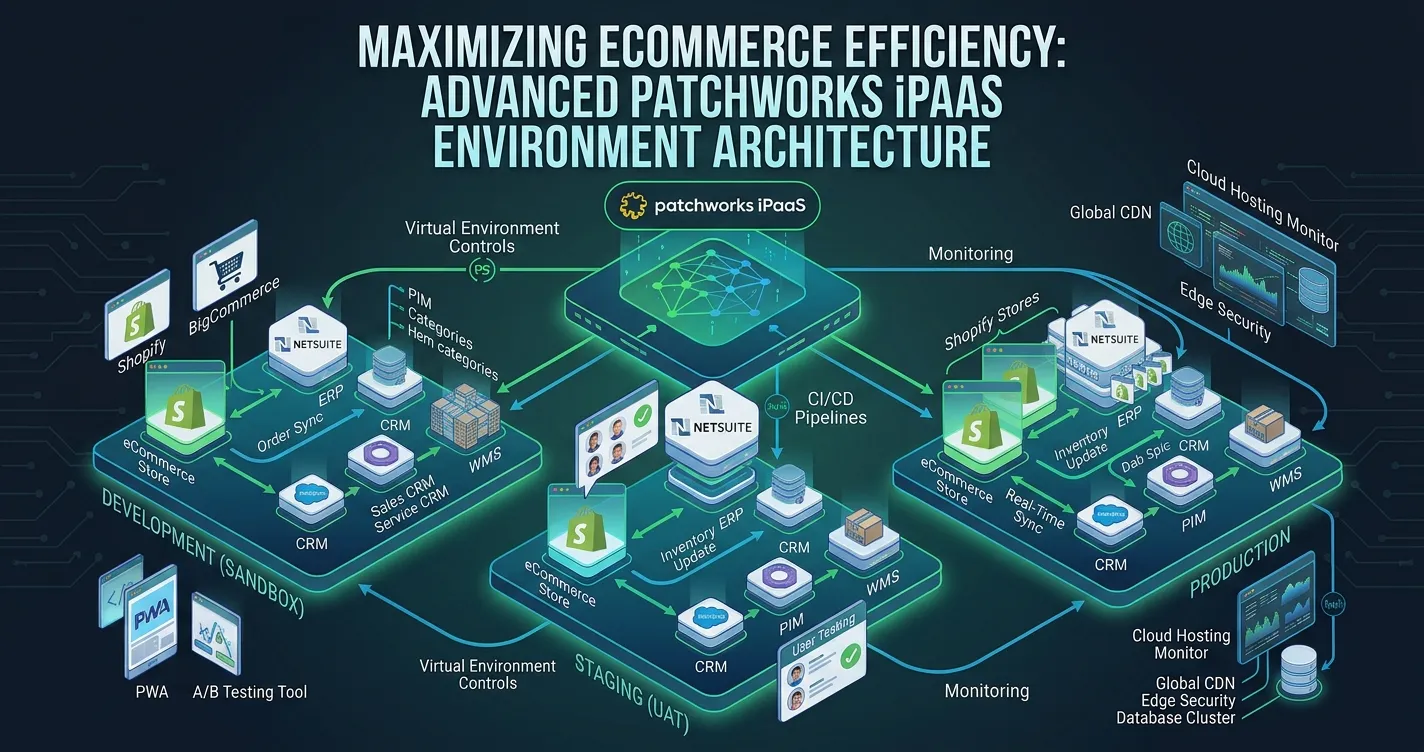
Patchworks virtual environments fix this. Instead of copying flows, you build a small set of master process flows and create a virtual environment for each store and environment combination. Each virtual environment holds a set of replacements (overrides) that Patchworks applies when the master flow runs there.
The result is one flow, many environments, and a single place to make changes.
The Duplication Problem Agencies Know Too Well
Take a typical multi-region retailer. Five countries, each with a sandbox and a live Shopify store, comes to ten environments. Five core processes, such as orders, inventory, fulfilments, products and customers, makes 50 process flows to maintain.
When the client asks for a change to order mapping, someone has to make it 10 times. Every copy is another chance to make a mistake, and the copies slowly drift apart. For an agency, that is time you either can't bill for or have to justify to the client.
How Virtual Environments Work
The setup follows a simple pattern:
- Build master flows for each core process, holding the shared business logic.
- Create a virtual environment for each store and environment combination, for example "UK Sandbox" and "UK Live".
- Configure replacements so each environment uses the right credentials, data and settings.
- Deploy flow versions to environments one at a time, or several at once.
What You Can Override
Replacements cover the parts of a flow that usually change between stores and environments:
- Connector instances (for example, a different Shopify store per region)
- Data pools used by the de-dupe shape
- Cross-reference lookups used in field mappings
- Custom scripts
- Company caches
- Flow variables and flow queue priority
The business logic stays in one place. Only the parts that differ between environments are swapped in.
Deploying Changes Safely
Virtual environments use flow versioning, so you choose exactly which version of a master flow runs in which environment. You can test a change in a sandbox environment, check it, and then deploy the same version to live.
For larger rollouts, packages bundle several flow versions and target environments into one deployment. The compare feature shows which versions are deployed where, which is useful when a client asks what is running in production.
Everything in the dashboard is also available through the Patchworks API. Agencies with established DevOps practices can add deployments to their CI/CD pipelines, automate releases and keep configuration under version control.
Why This Matters for Agencies
For agencies, virtual environments change how you scope, deliver and support Patchworks projects:
- Faster rollouts. Launching a new region becomes a configuration task, not a rebuild.
- Lower support overhead. Fixes and improvements are made once and deployed everywhere.
- Safer releases. A proper sandbox-to-live path reduces the risk of breaking a client's production integration.
- Cleaner handover. A small set of master flows is far easier for clients, or your own team, to understand.
Things to Plan For
Virtual environments are available on all core Patchworks subscription tiers. Each tier includes up to two virtual environments by default, typically one test and one live. Clients who need more will have to contact Patchworks. Your existing tier and bolt-on allowances still apply to flows running in virtual environments, so include this when you scope a project.
The initial setup also takes some thought. You need to decide which logic is shared and what each environment should override. That effort pays off the first time a client asks for a change across every store.
Get Help Setting Up Virtual Environments
CommerceStream is a Patchworks build partner that works with agencies to design, build and maintain Patchworks integrations. If you are planning a multi-store rollout or want to consolidate duplicated flows into virtual environments, get in touch and we'll help you get the structure right from the start.
For full technical details, see the official Patchworks virtual environments documentation.

Related Post
Our team of experts shares the latest research, tips, and in-depth analysis.Dive into new articles to stay informed and inspired.

The Power of Social Media Marketing
Social media marketing continues to be a game-changer for businesses.
Sophia Bennett
Social Media Manager

SEO Techniques That Work in 2026
Search Engine Optimization remains part of any successful digital marketing strategy.
James Anderson
SEO Specialist

Digital Marketing Strategies for 2026
As the digital marketingbusinesses need to stay ahead with innovative strategies.
Sarah Williams
Digital Marketing Manager
Need your systems connected?
Book a 15-min chat to discuss your integration requirements and see how we can help you get more from the Patchworks platform.
Book a Call